Automating a shared inbox with an AI agent: deciding where it should stop
Short answer: an AI agent can read every incoming email, pull out the sender and request, classify what the person wants, update your CRM and draft a reply. The part that makes or breaks it is not the model. It is deciding which messages the agent must never answer on its own, and giving it a safe default for email that fits no category.
I built this kind of workflow for inbox triage and CRM updates. Here is how it is designed, and where I draw the lines.
What does an AI email agent actually do?
A shared inbox is a queue of small decisions. Someone reads each message, works out what it is, updates the CRM and replies. The work is repetitive, but it depends too much on context for keyword rules to handle well.
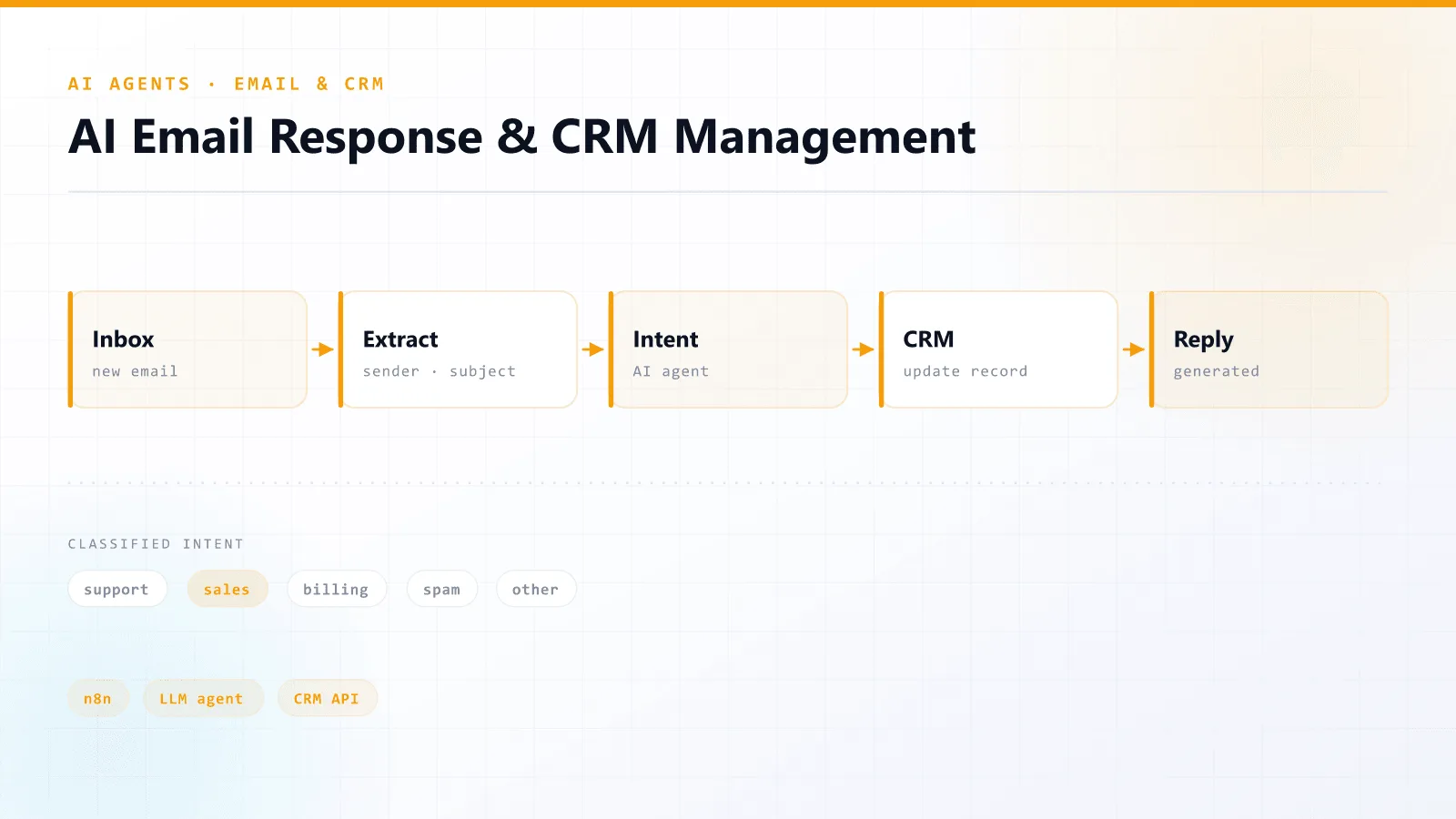
The agent takes over that loop:
- Trigger: a new email arrives.
- Extract: sender address, subject and body become structured fields.
- Classify intent: the agent works out what the sender actually wants.
- Act: the matching CRM operation runs for that intent.
- Respond: a reply is generated and sent, when the reply is safe to send.
Why not just use keyword rules?
Because people do not write in keywords. "Can we move Thursday?", "Thursday no longer works for us" and "Something came up, sorry" are the same intent with no words in common. Rules either miss them or grow into a list nobody can maintain.
| Keyword rules | AI intent classification | |
|---|---|---|
| Handles varied phrasing | Poorly | Well |
| Setup effort | Low at first, grows forever | Moderate, then stable |
| Explains its decision | Yes | Only if you ask it to |
| Failure mode | Silently misses messages | Confidently picks the wrong category |
That last row is why the design work matters.
Where should the automation stop?
This was as important as what the agent does. Some messages should always reach a person, however confident the model is. For most businesses that includes:
- Complaints and anything emotionally charged. A fast, fluent, wrong-toned reply does more damage than a slow human one.
- Anything involving money: refunds, disputes, pricing exceptions.
- Legal or contractual language.
- Messages from your largest accounts, where the relationship is worth more than the time saved.
For these, the agent still does the useful parts. It extracts the details, updates the CRM and drafts a reply, but a human sends it.
What happens when the AI is not sure?
Real inboxes contain email that fits no category. A good workflow never forces a wrong classification to keep things moving. It needs a defensible default: route the message to a person, labelled with what the agent could and could not work out.
The goal is not to automate every email. It is to automate the routine ones completely, so people only see real exceptions.
What do you need to build one?
- An orchestration layer. I used n8n, which connects email, the LLM and the CRM without a custom backend.
- An LLM for extraction and intent classification.
- API access to your CRM so the agent can create and update records.
- A clear list of intents, plus the list of messages that must never be auto-answered. Write that second list first.
The workflow I built is open source on GitHub if you want to see the structure.
Frequently asked questions
Yes, for routine messages. An AI agent can extract the request, classify its intent, update the CRM and send a reply. Complaints, anything involving money, legal language and messages from key accounts should still be drafted by the agent but sent by a person.